
Note From Tongal: “Add 360 Cameras to Your Creative Arsenal" is part of a series of Tongal Community-written blog posts that were originally sourced in the Tongal Blog Open Call Project. Read more Tongal Community-written posts here and then Pitch us a topic you'd like to write about for the Tongal Blog!
---
As our camera technology advances, we're forced to adapt on the fly to keep up with the times. Our real estate marketing company recently purchased a GoPro Fusion 360 camera and have gone through the steps to get Google Street View Certified, allowing us to photograph new developments and the insides of businesses so people can literally walk the streets and tour restaurants and businesses from the comfort of their home. In this blog post, we'll detail all the information a beginner needs to know about 360 cameras, explain how we have grown our marketing company and services with this new technology, and show off some of our recent work and early trials and tribulations.
Still photography has gone through many revolutions over the course of history. The introduction of 360-degree cameras is especially exciting to those of us who work in the real estate industry. We can now turn still photographs into an immersive 3D experience, allowing viewers to see an entire room with just a single photograph. Our team at HomeSpot Media has spent the better half of this decade attempting to keep up with technology and utilize it in ways to grow our real estate marketing business. We were already offering our clients HDR Photography, FAA Licensed Drone Pilots, and 4K Video Tours, but the introduction of 360 virtual tours is something that has taken our business to the next level.
How to Create a 360 Photo Tour on Google Street View
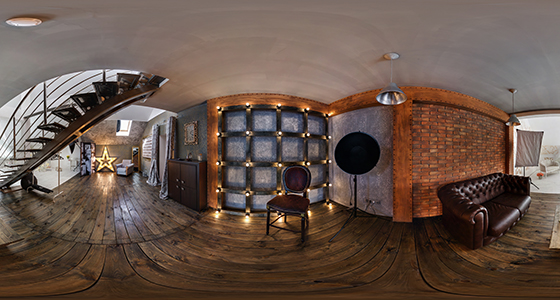
The way we create our 360 virtual real estate tours is fairly simple. We ask the home and business owners to make sure all the rooms are staged and ready to go. We set the camera up in the middle of each room and use the GoPro App on our phones to take the photographs, allowing us to hide from the camera. To acquire the best results, simply follow the natural flow of the home to make your life easier in the editing room. Always make sure to get at least one photograph of every room, otherwise, your virtual tour will won’t stitch together properly. If you’re photographing oversized rooms we’d recommend taking more than one photo so stitches together naturally.
When we first started using our new 360 camera, we made the mistake of thinking our existing micro SD cards were good enough to handle the file sizes and write speed of the camera. Our first few projects weren’t looking sharp and had pixelation despite rooms being well lit. After we upgraded the cards, the difference in clarity was staggering. If you’re going to be shooting with a camera like the Fusion, make sure you have the appropriate SD cards to give yourself the best image possible.
An early test with our old SD Cards produced dropoff on the edges of the camera
The biggest issue a 360 photographer runs into is making sure you’re not in any of the pictures. To avoid this from happening, you can apply one of two simple methods. When you’re filming outside, be prepared to jog around the block multiple times to keep yourself out of the photographs. If your cardio isn’t that great, you can always get creative and hide behind something. Parked cars, bushes, and trees are great tools to use to get yourself out of the shot. People might look at you like you’re a lunatic, but hey, you’ll save yourself a jog around the block.
Which car do you think we’re hiding behind?
There’s only one issue you may run into while applying this method. When using applications such as Google Street View, the app recognizes location tags from where your phone is located, not the physical camera. If you’re standing 200 feet from the camera hiding behind a tree, Google Street View thinks that tree is where the photo is being taken. This can easily be adjusted in the Street View app, or you can upload and create your virtual tour in a program like Panoskin before uploading it to Google Street View.
Another method would be to take two photos with you standing next to the camera on opposite sides, then edit yourself out in post. This process can take a bit longer and requires basic knowledge of Photoshop, but it’ll definitely get the job done as well.
Now that you have all your 360 photographs, it’s time to upload and stitch them together into a 360 tour. If you’re a Street View certified photographer, you can go right into the Street View app, select the photos you want to stitch together, then select the “move and connect photos” option. This will take you right to the map so you can see how your photos are aligned on Google Maps. If you used the “Hiding” method of photographing, this is where you’ll adjust the geo-tag to make sure your photographs match up perfectly on street view.
In the app, you simply connect the photos together and adjust the viewpoint of each photo. Once the photos are adjusted and you’re satisfied, you can select the checkmark and exit. Google should then save the stitching and positioning of your photos, which then creates a virtual tour allowing viewers to travel along the path you created.
If you’re filming 360 tours for real estate purposes, you can upload your photos to online applications like Panoskin or Transported to create and host your virtual tours. This process is similar to using the Street View application, but each program has its own methods of stitching together the photos. If you take 10 minutes to watch the tutorial videos on their websites you’ll be ready to go! After all the stitching is completed you can then manually upload the tour onto Google Street View, which will allow people from all over the world to access your photos and tour the location online.
Our company has had a wide variety of businesses and commercial real estate sellers contact us about utilizing 360 technology. Offering this type of unique service allows us to stand out amongst the competition and meet clients we otherwise wouldn’t have met. It’s a great way to get your foot in the door with local businesses and creates a relationship that could lead to more work in the future. If you’re a marketing company that’s thinking about adding a 360 camera to your arsenal, what are you waiting for?