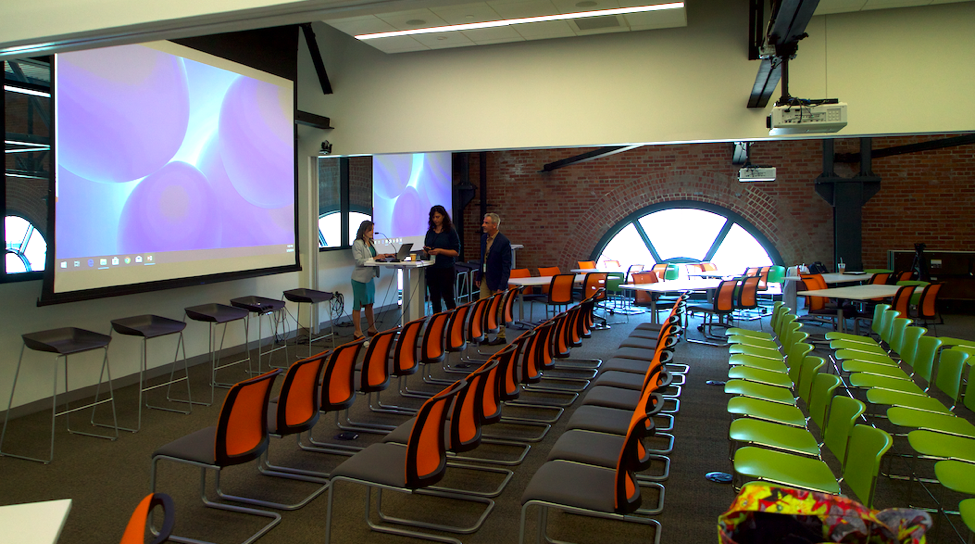
Working in video, chances are that you will, if you haven’t already, be asked to do some work for an event or conference. While this type of work has been going on for years, the current content climate and organizations’ growing needs for it are changing. Gone are the days of the singular, standard “Overview” Video. We are now in the days of the multiple “Experience” Videos, where we squeeze every last drop of juice from the orange. At LittleFire, our team has worked on dozens of these types of videos throughout the years. In that time, we have seen the format evolve and can now see where it is going, so I’m here to share with you that new landscape. And hopefully, this will help you communicate these ideas to your clients and partners as well.
When setting out to create the best video and content experience possible for your client, the very first thing to talk with them about is what they’re looking for. Duh? Yeah, duh. But as we all know, sometimes ‘Duh’ to us, is not ‘Duh’ to them. Are they looking for a single 90 to a 120-second video of the event or program, an overview of the attendees, participants, speakers, teachers, etc.? These tend to be afterthoughts to clients, often said in one of the last meetings they have before their event when someone in the room says “Oh, hey, shouldn’t we get video of this thing?”. To some, it may seem like these types of clients don’t know what they’re looking for, when in fact, given this context, they most likely do know what they’re looking for – it’s just a simple and straightforward coverage video – the “something to show” when they want to communicate they’re an active organization.
Anything beyond that video, though, should prompt you to dive into our tips below:
Maximizing the Content
Get ahead on the material, learn the line-up, make cut-down suggestions your video partner hasn’t thought about yet. If there’s an itinerary, get your hands on it. Start thinking about where you and your video partner might be able to turn one long video into several different releases. For example, if your event features a speaker talking about sustainable fishing, be on the lookout for key topics they’re going to speak about. Two or three sentences about method, thirty seconds about the most at-risk species, etc. These can be released on their social media streams as short content with title and end cards, and it will keep their content constant, which is where everyone wants to be now. You can also pull the audio of various speakers for podcasts, should your video partner be looking for that as well.
Timeline
Learn their timeline. What do they want and when do they want it? More often than not, a client is looking for “a general overview” of a small event, and they’d “like it by the end of the month or something...” Great, they’re laid back. But put a date on it. With no dates, deliverables get lost, they can go on and on with endless revisions as well. Limit those to two or three. If they want more than one video, you’ll live and die by these dates and especially milestones. If you need something from them, don’t be afraid to ask for it by a certain time. And if you don’t get what you need, make sure you always let them know what the result will be. For instance, if you don’t have slides from a presenter, they can’t go into the video. If you don’t get logos before you get to your color grade, they may not be the right tone, and so on. You’re their partner, and you’re here to work with them.
Comprehensive Coverage
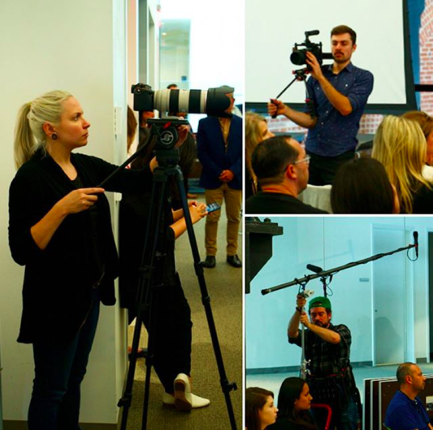
If your client is looking for what we’ll call “Comprehensive Coverage” of the event, what they’ll want is likely coverage of the event from start to finish. That would be something like this:
Attendees Arriving
Speakers/Featured Personnel Arriving
Pre-Event Mingling
Introduction
Speakers/Featured Personnel
Workshops
Meal/Snack Coverage
Closing Remarks
Chances are, as a videographer, you can get all of this. You’ll be busy moving around faster than Leslie Knope during Harvest Fest, but you should be able to get everything with proper planning. Remember to tie into the AV system or bring an external recorder to put next to the speaker’s podium. Also, remember to make sure to speak with the event organizers to ask the speakers to avoid standing directly in the light as it’s projected.
That’s the simplest version of Comprehensive Coverage. Single-camera, acceptable audio, proof of the organization’s engagement and footprint, many organizations will be happy with that. Now, however, is where we start to get into the more complex experience and logistics when dealing with Event and Conference Video.
Total Experience Coverage
This is the beast. The multi-cam, better have a game plan, someone please get me the event manager’s email address, we’re gonna maximize this content for a full year, beast. When a client wants Total Experience Coverage, there is a decent chance they do not know what that entails, so it’s our job as their vendor or partner to walk them through it.
First and foremost, be upfront about potential pitfalls and costs. This will help the client to understand that what they’re looking for can have an à la carte element to it, but also that this can be a massive undertaking. Ninety percent of the time, the organization will respect your assessment and experiential-based knowledge and allow you to do what they can afford. Ten percent of the time you’ll encounter a personality that does not do that.
It’s rare, but after all this time, we still encounter people in this situation that simply do not grasp what this entails, no matter how much you try to explain and educate them. My personal favorite example of this is from a recent project where a creative director was asking for coverage that would require additional resources. When we told him we’d need an additional camera person to move about freely to get that, he disagreed. When we explained it to him further, he responded with “Yes, you’re the professionals here, but you’re wrong.” We had to reread that email three times to make sure it wasn’t an illusion. All we could do is explain that with the given resources, “your content will look like X,Y, and Z. We will make our best efforts to get the additional content you want, but we cannot make certain promises and we cannot put them into our Statement of Work”. How you handle instances of that nature is entirely up to you, but as always, in times of frustration, conduct yourself with respect and kindness, and always, always be direct.
Often times, when a client wants Total Experience Coverage, we come to an understanding with them that if the video is just as, if not more important, than the event/conference itself, then the event/conference must do its best to adhere to the logistics of video coverage, whenever possible, rather than the other way around. For example, if there is a Q&A after a speaker and your client/partner would like coverage of that, let them know this will require multiple cameras (at least two) and a hand-mic to clearly hear the person asking the question. While the speaker may be answering a question from their mic, the questioner will most likely not have a mic of their own. A moderator or someone from the event team will have to pass the mic around.
Panels & Workshops
If the event has a panel, and your resources are limited, make sure you’re upfront about that. Let your partner know that one camera will yield only two types of panel videos; one pointed directly at, and only the panel, like Comic-Con videos, or one where you’re doing whip pans back and forth with the panel and the Q&A participants. You might be able to cut things together decently, but you won’t know until you start your edit so you shouldn’t make any promises.
If you have two cameras, you’re going to be great; keeping one on the panel, and one on either the standing mic for the Q&A in an aisle or have it follow a moderator as they move around the room.
Workshops can be done well with one camera, but it’s the audio that can be the biggest hurdle in these scenarios, as with so many people talking, it may be difficult to isolate the subject you’re focusing on in any given moment. It’s also very difficult to get a complete video of workshops from start to finish if there are group breakout sessions. You’d need one camera/audio set up per group, and your partner would have to be okay with the handheld nature needed for this. You want to avoid a boom mic in these situations and try a camera mounted mic whenever possible. It’s best to suggest a “general overview” video for any workshops, as it’s going to save everyone a lot of time, and your client money, which would make them happy, and we do like our clients to be happy.
Activations
Activations are becoming more popular among the larger brands and require more interactive-based activities. They encourage brand personnel interaction with attendees. Your client may want video coverage of these things and depending on how much, may require a dedicated camera as you may be required to film something else at the same time. An example might be the release of a new video game, where your client has designated an area to have actors in costume as some of the characters to have their picture taken with attendees, or a brand may be launching a new ice cream and have a station where people can make their own sundaes with it. You can get general coverage of these things, or you can talk to some of the participants, get their thoughts and experiences on camera, like micro-influencers if it helps to think of it like that. Clips of this footage can be part of that sacred Overview video and/or they can be their own smaller video compilations.
Interviews
You may be asked to get some reactions and stories from people attending the event you’re covering. Make sure you work with your client to identify an ideal time. Lunch may sound like a good idea, but realistically you’ll be hard-pressed to get people to give up time eating their sandwich or salad to talk with you about their day so far. If possible, work with your partner to identify potential attendees they may know will be present ahead of time, and try to find the best downtime to do it. Be mindful of the lighting and setup times you require as well.
If possible, don’t forget to get the event organizers on camera as well so they, too, can share their thoughts and comments. These may be the perfect VO moments you didn’t know you needed, so it’s good to have them.
B-roll Tips
B-Roll. Sweet, sweet lifesaving B-Roll. Is there a program? A flyer? Get footage of it. Get footage of everything you can. Detail shots can make all the difference. They can help make a dynamic intro or lead-in and provide transitional opportunities.
Slides
Get those slides. It’s unlikely you’ll be able to capture both the speaker and any slides behind them on a projector screen in a decent looking frame the whole time, so focus on the speaker, tease some of the slides behind them in the frame a little if you can make it work, and cut to the slides in the edit when they bring them up in their speech or whenever they switch to a new slide. Slides can also serve as a guideline for micro-videos. Each key slide could serve as a small 60-second video for your video client’s social stream. They may not all work, but it’s a good idea to look at the possibility.
In Conclusion
Every video and content partnership will be unique, and sometimes your client may not be looking for anything other than an Overview video, which is perfectly fine. But as you can see from above, you’ll always be able to maximize your content – and it is your demonstration of your mindset and abilities to do so that will set you apart from other videographers/filmmakers in the same arena. Trust me, the right people will take notice, and you might just find yourself with more than a few fruitful opportunities in the near future.
_______
Note From Tongal: “Your Event Video Production Survival Guide" is part of a series of Tongal Community-written blog posts that were originally sourced in the Tongal Blog Open Call Project. The views and opinions expressed in this article are those of the author(s) and do not necessarily reflect the official policy or position of Tongal. Read more Tongal Community-written posts here and then Pitch us a topic you'd like to write about for the Tongal Blog!